
![AI-generated image quality: from raw output to professional use [15 sources reviewed]](/blog/content/images/size/w2000/2026/03/ai-gen-image-quality-cover.jpg)
More than 15 billion AI-generated images have been created since mid-2022, according to Everypixel. Photography took 149 years to hit the same number. AI did it in about a year and a half.
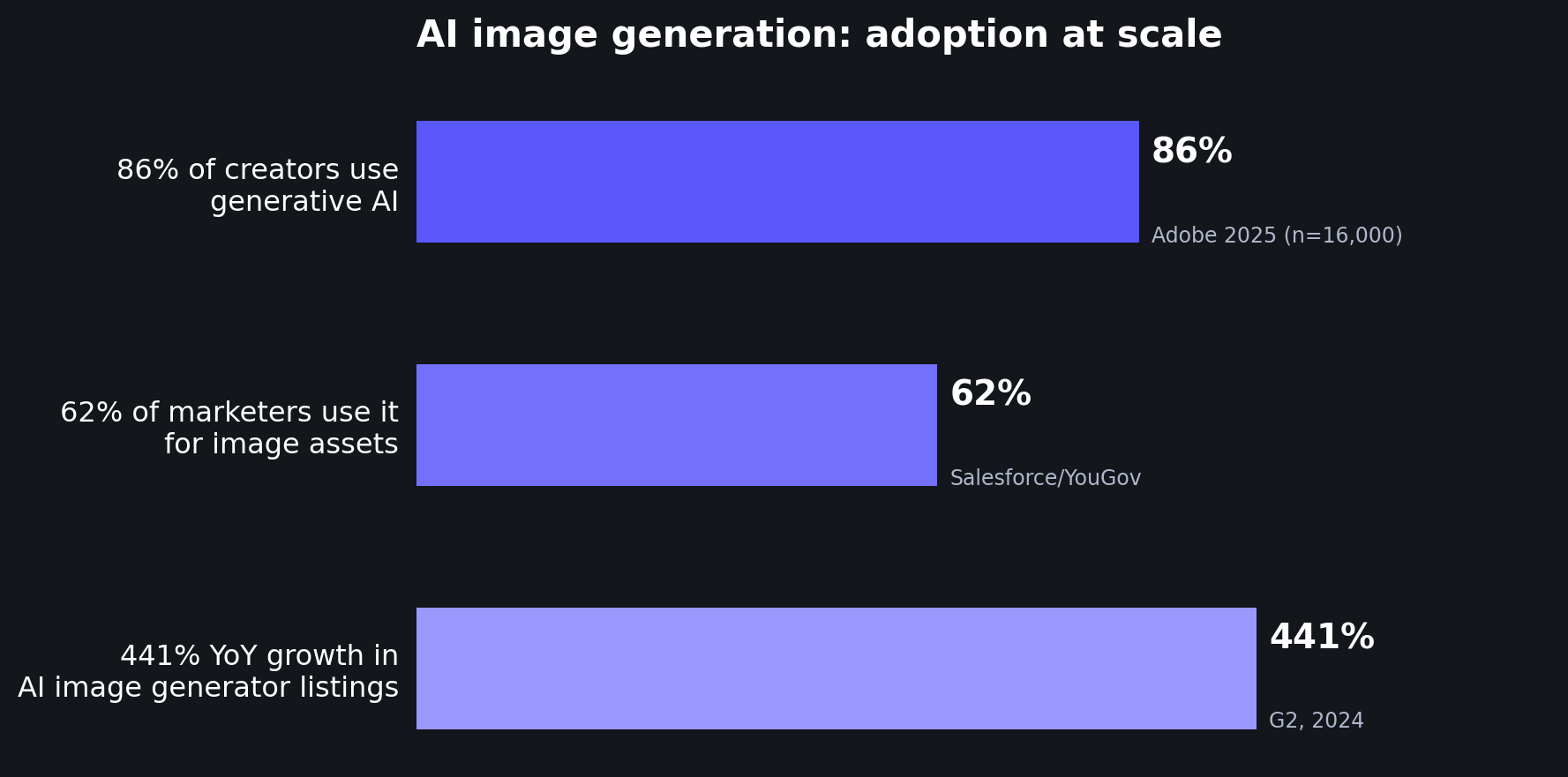
The tools are everywhere. 86% of creators now use generative AI in their work, per Adobe's 2025 survey of 16,000 creators across eight countries. 62% of marketers use it specifically to generate image assets (Salesforce/YouGov). On G2, AI image generators were the fastest-growing software category of 2024, with 441% year-over-year growth in listings.
But adoption and quality aren't the same thing. Most AI generators produce images at 1024×1024 pixels, or about 1 megapixel. That's fine for a social post. It's nowhere near enough for a print-on-demand product, a large-format poster, or even a sharp product listing on a marketplace.
This post collects what the research actually says about the quality of AI-generated images, where the gaps are, and how creators are bridging them.
The resolution gap is the biggest practical problem
Here's the core tension: AI image generators produce small files, but professional use cases demand large ones.
Most popular generators, including DALL-E 3, Stable Diffusion XL, and standard FLUX Pro, output at 1024×1024 pixels natively. Midjourney V6 and V7 start at 1024×1024 and offer a 2× upscale to 2048×2048. FLUX 1.1 Pro Ultra pushes to 2048×2048 (4 MP) without upscaling.
Newer models are starting to close this gap. Google's Nano Banana Pro and Nano Banana 2 (built on the Gemini 3 architecture) can generate images at 1K, 2K, and 4K resolutions natively. ByteDance's Seedream 4.0 and newer versions produce native 4K output (up to ~4096 pixels). FLUX.2, released in early 2026, generates at native 4 MP resolution. OpenAI's GPT Image 1 outputs at 1024×1024 to 1536×1024 natively, though the API supports up to 4096×4096 with scaling. Imagen 3 from Google generates at 1024×1024 for square images.
Even with these improvements, there's still a significant gap between what generators produce and what professional workflows require.
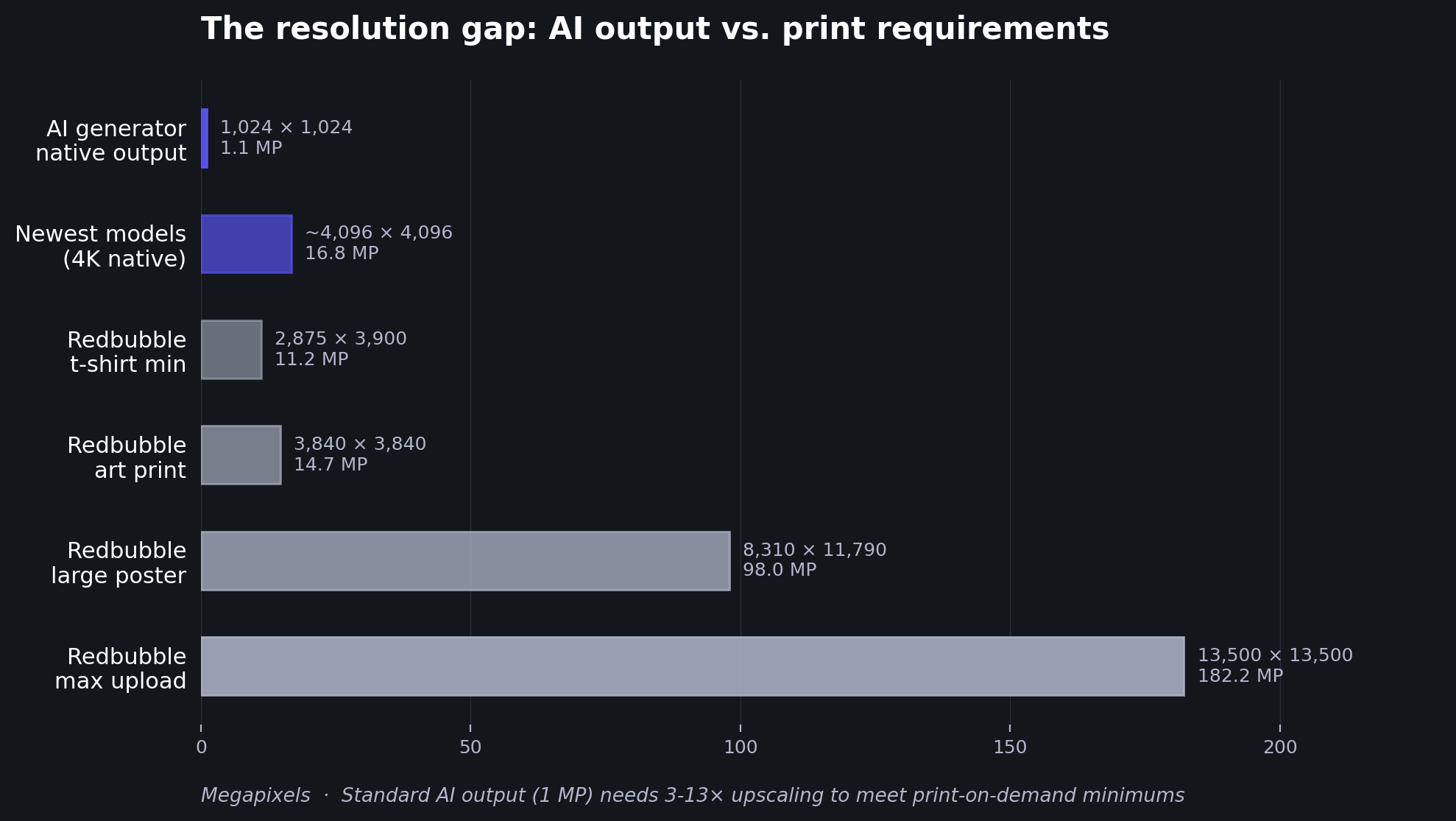
Consider print-on-demand. Redbubble's requirements start at 2,875×3,900 pixels for a t-shirt, 3,840×3,840 for an art print, and go up to 8,310×11,790 for a large poster. The platform's maximum upload is 13,500×13,500 pixels, and their printers use actual pixel dimensions (DPI settings don't change the final print).
A standard 1024×1024 AI output would need to be upscaled roughly 3× just to meet a t-shirt minimum, and 8-13× for large-format prints. Even the newest 4K-native generators produce images that fall short of large poster requirements by a factor of 2-3×.
This isn't a niche concern. The AI image enhancer market was valued at $2.6 billion in 2024 (Market.us), while the AI image generator market reached $8.7 billion that same year (MarketsandMarkets). The enhancement market exists, in large part, because generation alone doesn't get you to a finished product.
Quality issues go beyond resolution
Resolution is the most measurable gap, but it's not the only one. Researchers have started systematically cataloging the quality problems in AI-generated images.
Zhang et al. (2023) created the AGIQA-1K framework, the first perceptual quality assessment study specifically for AI-generated images. After evaluating 1,080 images from diffusion models, they identified five distinct quality dimensions: technical issues, AI artifacts, unnaturalness, discrepancy (mismatch with the prompt), and aesthetics. Their conclusion: AI-generated image quality "varies, necessitating refinement and filtering before practical use."
Those five dimensions map well to what creators encounter every day. Hands with extra fingers. Lighting that doesn't match the scene. Text that looks almost right but falls apart on close inspection. Backgrounds with objects that blend into each other.
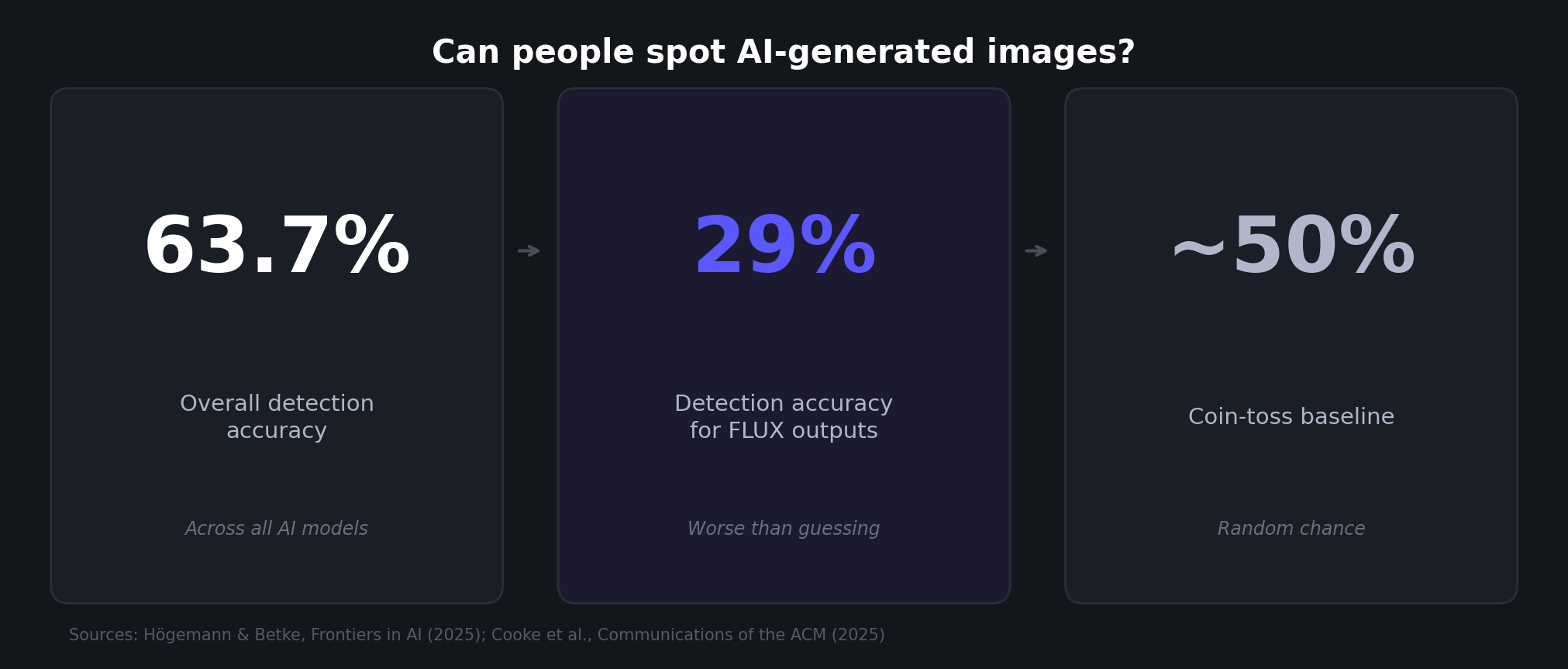
A 2025 study by Högemann et al. tested whether people could identify AI-generated images. Participants were correct 63.7% of the time overall, but for images from FLUX.1-dev, detection dropped to just 29%. The qualitative analysis of 511 justifications found that classic visual flaws persist: "geometric inconsistencies, unrealistic lighting, and semantic anomalies." But newer model outputs were increasingly described as "too perfect" or "faintly uncanny," a different kind of quality problem than the obvious artifacts of earlier models.
For professional use, the implication is clear: quality issues in current AI output are shifting from obvious errors (six fingers, melting faces) toward subtler problems (slightly off lighting, textures that are too uniform, a general synthetic feel). These subtler flaws may not matter for a social media thumbnail. They can matter a lot for a product photo that needs to look real, or a fine art print where buyers will scrutinize details.
AI output has crossed the realism threshold for casual viewing
The flip side of persistent quality issues is that AI-generated images have become remarkably convincing in everyday contexts.
Cooke et al. (2025) ran one of the largest detection studies to date: 1,276 participants trying to distinguish AI-generated content from authentic media. The result: detection accuracy was near chance level, roughly 50%. A coin toss. Prior knowledge about synthetic media didn't significantly improve accuracy. Older participants performed worse, but no demographic group was reliably good at spotting AI content.
This creates an interesting dynamic for creators. The visual quality of AI output is now good enough to be indistinguishable from real images in most casual contexts (scrolling a feed, browsing a listing). The problems show up when you zoom in, when you print large, or when you need pixel-level consistency across a set of product images.
In other words, the generation step has largely solved the "does this look real" question. What it hasn't solved is the "is this production-ready" question.
The generate-then-enhance workflow is becoming standard
This gap between "looks good on screen" and "ready for production" has given rise to a specific workflow: generate the image with AI, then enhance it for professional use.
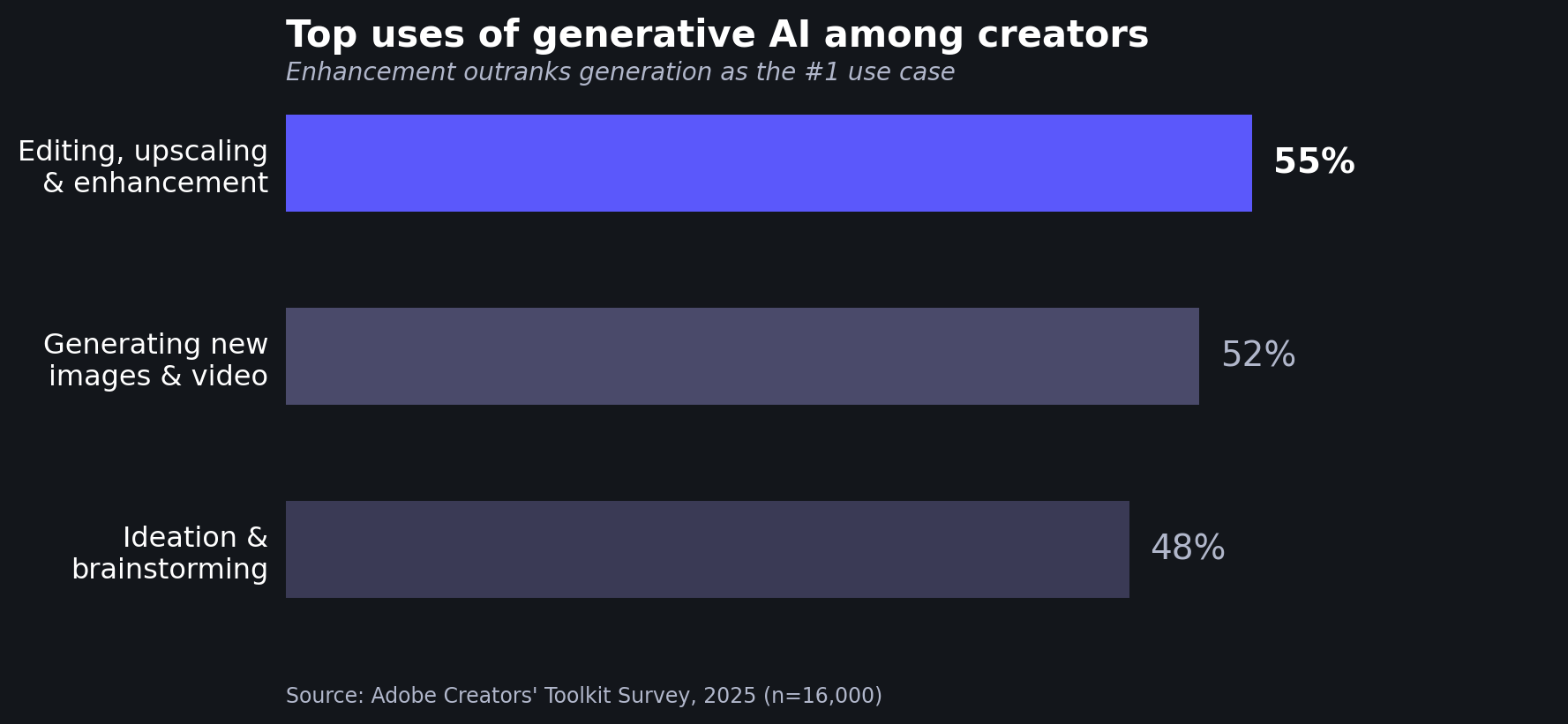
Adobe's 2025 Creators' Toolkit survey of 16,000 creators found that the top use of generative AI wasn't generating new assets. It was editing, upscaling, and enhancement, at 55%. Generating new images and video came second at 52%, followed by ideation and brainstorming at 48%.
That stat is striking. More creators use gen AI to improve existing images than to create new ones from scratch. The enhancement step isn't optional; it's the most common use case.
The same survey found that 81% of creators say generative AI enables content creation that would otherwise be impossible. But 34% cite unreliable output quality as an adoption barrier. Both things are true at once: AI generation is transformative, and the raw output often isn't good enough to use directly.
This pattern plays out concretely in the AI art and print-on-demand space. An artist generates an image in Midjourney or FLUX at 1024×1024. It looks great on screen. But to sell it as a poster on Redbubble, they need to upscale it to at least 3,840×3,840 pixels, roughly 14× more pixels than the original. That upscaling step needs to add realistic detail, not just stretch the existing pixels into a blurry mess.
The same applies to product photography. Marketers generating product shots with AI need those images to be high-resolution and artifact-free before they go into listings, ads, or print catalogs. 62% of marketers already use gen AI for image assets (per the Salesforce data above), and that number only works if there's a quality pipeline after generation.
Stock platforms have drawn a line on quality
The quality gap is visible in how stock photography platforms have responded to AI-generated content.
Shutterstock explicitly bans AI-generated submissions from contributors, citing IP ownership and artist compensation concerns. Getty Images has a similar ban in place.
Adobe Stock takes a different approach: they accept AI-generated content but require disclosure (contributors must check "Created using generative AI tools") and specifically advise checking "the anatomy of your content" for errors. They also limit submissions to three iterations per prompt, a tacit acknowledgment that raw AI output needs manual review and refinement.
These policies reflect a market that recognizes AI generation's potential but doesn't trust raw output quality. Even the platform that accepts AI content builds quality gates into the submission process.
What this means for creators
The data tells a clear story. AI image generation has reached massive scale (15B+ images) and broad adoption (86% of creators, 62% of marketers for image assets). The visual realism is good enough that humans can't reliably tell AI images from real ones in casual viewing.
But professional use cases, printing, stock licensing, marketplace listings, advertising, expose the gap between "looks good at 1024 pixels" and "ready for production." That gap is a combination of resolution (1-4 MP native vs. 8-180 MP requirements for print), artifacts (persistent quality issues across five documented dimensions), and consistency (achieving uniform quality across a set of images rather than one good shot).
The generate-then-enhance workflow has emerged as the practical answer. Over half of creators already use gen AI tools for enhancement and upscaling, not just generation. The resolution gap specifically is why AI art upscaling has become a standard step for anyone working with AI-generated images professionally.
If you're creating AI-generated images for anything beyond social media thumbnails, the quality pipeline after generation matters as much as the generation itself. Your choice of upscaler determines whether a 1024×1024 output becomes a sharp, detail-rich print or a blurry enlargement. And for AI art specifically, you want an upscaler that adds realistic detail without changing the image's style or character, which is a different challenge than upscaling a photograph.
LetsEnhance.io offers multiple upscaler models tuned for different needs: from Gentle (preserving every fine detail, including text) to Strong and Ultra (creative enhancement that can transform low-quality inputs). For AI-generated art, the Digital Art upscaler is optimized specifically for illustrations, paintings, and anime. If you just need to hit a specific resolution target, the HD converter handles that in one step. You can also generate images directly on the platform and upscale them in one workflow, skipping the export-import step entirely.
Sources
Peer-reviewed research
- Zhang, Z., Li, C., Sun, W., Liu, X., Min, X., & Zhai, G. (2023). A perceptual quality assessment exploration for AIGC images. 2023 IEEE International Conference on Multimedia and Expo Workshops (ICMEW), 440-445. DOI: 10.1109/ICMEW59549.2023.00082
- Högemann, M., Betke, J., & Thomas, O. (2025). What you see is not what you get anymore: a mixed-methods approach on human perception of AI-generated images. Frontiers in Artificial Intelligence. DOI: 10.3389/frai.2025.1707336
- Cooke, D., Edwards, A., Barkoff, S., & Kelly, K. (2025). As good as a coin toss: human detection of AI-generated content. Communications of the ACM, 68, 100-109. DOI: 10.1145/3729417
Industry sources
- Everypixel Journal (2024). AI image statistics for 2024: how much content was created by AI.
- Adobe (2025). Adobe MAX 2025 creators' toolkit survey. Survey of 16,000 creators across 8 countries.
- Adobe (2024). Creative pros are leveraging generative AI to do more and better work. Survey of 2,541 creative professionals.
- Salesforce/YouGov (2023). Generative AI statistics. Survey of 1,000+ full-time marketers.
- G2 (2024). 5 trends shaping the state of software.
- Icons8 Blog (2025). Redbubble image size requirements.
- Market.us (2025). AI image enhancer market report.
- MarketsandMarkets (2024). AI image generator market.
- Shutterstock (2025). AI-generated content on Shutterstock: contributor FAQ.
- Adobe Stock (2025). Generative AI content submission guidelines.
- MindStudio (2024). What is FLUX 1.1 Pro Ultra. Used for resolution specifications.
- Aiarty (2024). Midjourney upscale guide. Used for resolution specifications.
