

Your product listing can have a perfect title, competitive pricing, and five-star reviews but still get buried. It all can be because of one image that's 800 pixels wide, slightly off-white, or just not sharp enough to trigger the zoom function.
Amazon and Etsy enforce image standards that are stricter than most sellers expect, and the consequences of getting them wrong range from reduced search visibility to outright listing suppression.
This guide covers every spec you need to know across both platforms, explains what's actually happening when your image gets rejected or your listing tanks in search, and shows how AI upscaling tools can close the gap when your original photos don't make the cut.
Key takeaways
- Amazon main image: pure white background (RGB 255,255,255 exactly), product fills ≥85% of the frame, minimum 500 px on the longest side, recommended 2,000×2,000 px, max 10,000 px, max 10 MB file size
- Etsy listing photos: minimum 2,000 px on the shortest side for zoom, square format (2,000×2,000 px) is the most versatile, file size under 1 MB for reliable upload, sRGB color mode required
- Etsy backgrounds: no white background requirement. Styled, lifestyle, and contextual images are actively encouraged
- Both platforms: JPEG is the preferred format; PNG works but creates larger files; animated GIFs aren't supported for product listing images
Amazon image requirements
Main image rules
Amazon's main image (also called the hero image or MAIN image) is the one shoppers see in search results and at the top of the product detail page. It has the strictest requirements of any image type on the platform, and violations are caught automatically.
Background: The background must be pure white (RGB 255, 255, 255). Not cream, not light gray, not "close enough." Amazon's systems scan uploaded images and detect backgrounds that aren't exactly 255,255,255. Even if the difference is invisible to the human eye, the algorithm catches it. A photograph shot in front of a white wall will almost always fail this test; the background needs to be set in post-processing and verified with a color picker.
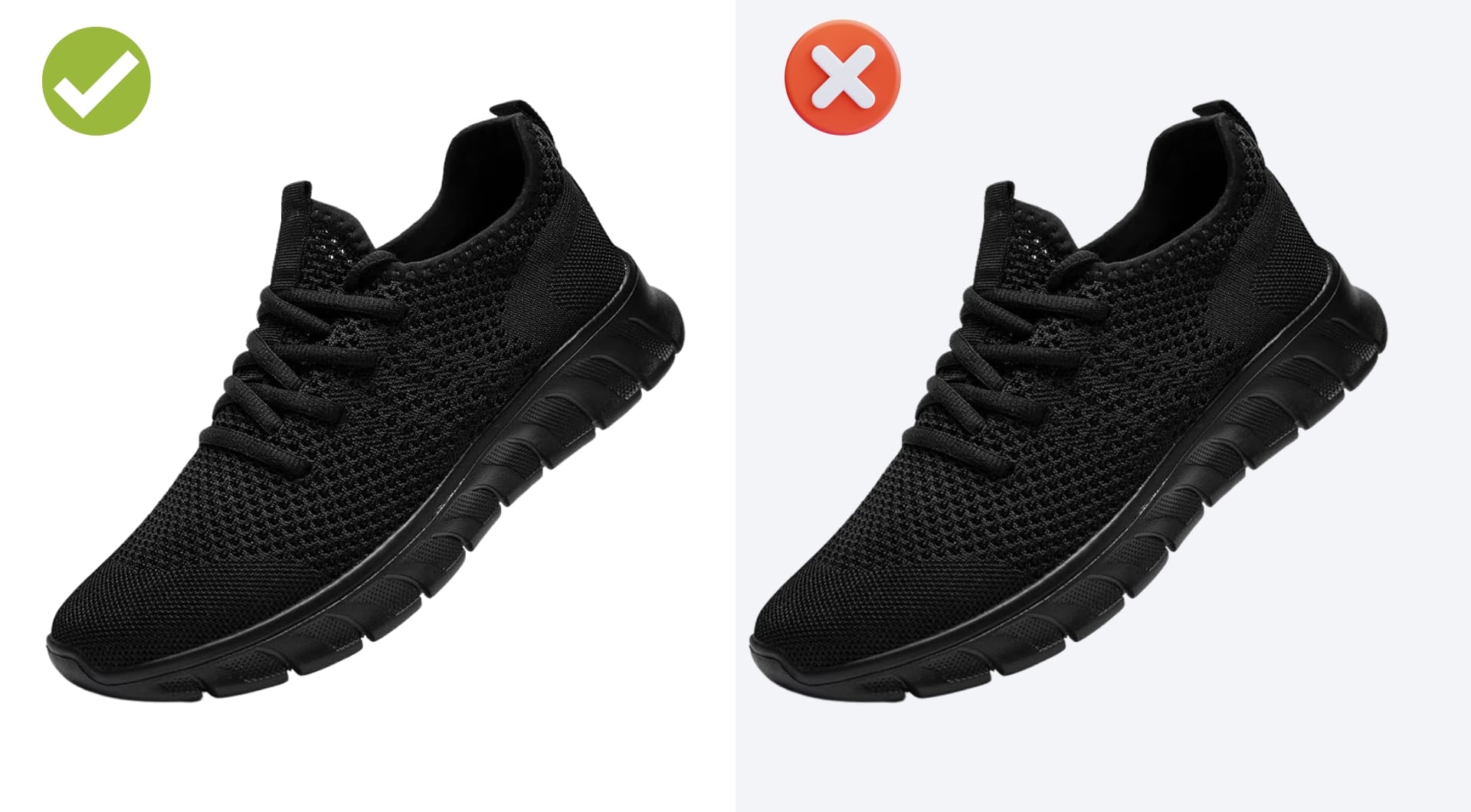
Product fill: The product must occupy at least 85% of the image area. Images where the product floats in a large white field are a common rejection trigger.
No overlays: No text, watermarks, borders, logos, badges ("Best Seller," "Top Rated"), or price tags of any kind on the main image. These all result in immediate suppression.
What the product must show: The product in its sold state, outside its packaging (unless the packaging is part of the product, as with consumables), showing the full item with nothing cut off. If an accessory isn't included in the purchase, it can't appear in the main image.
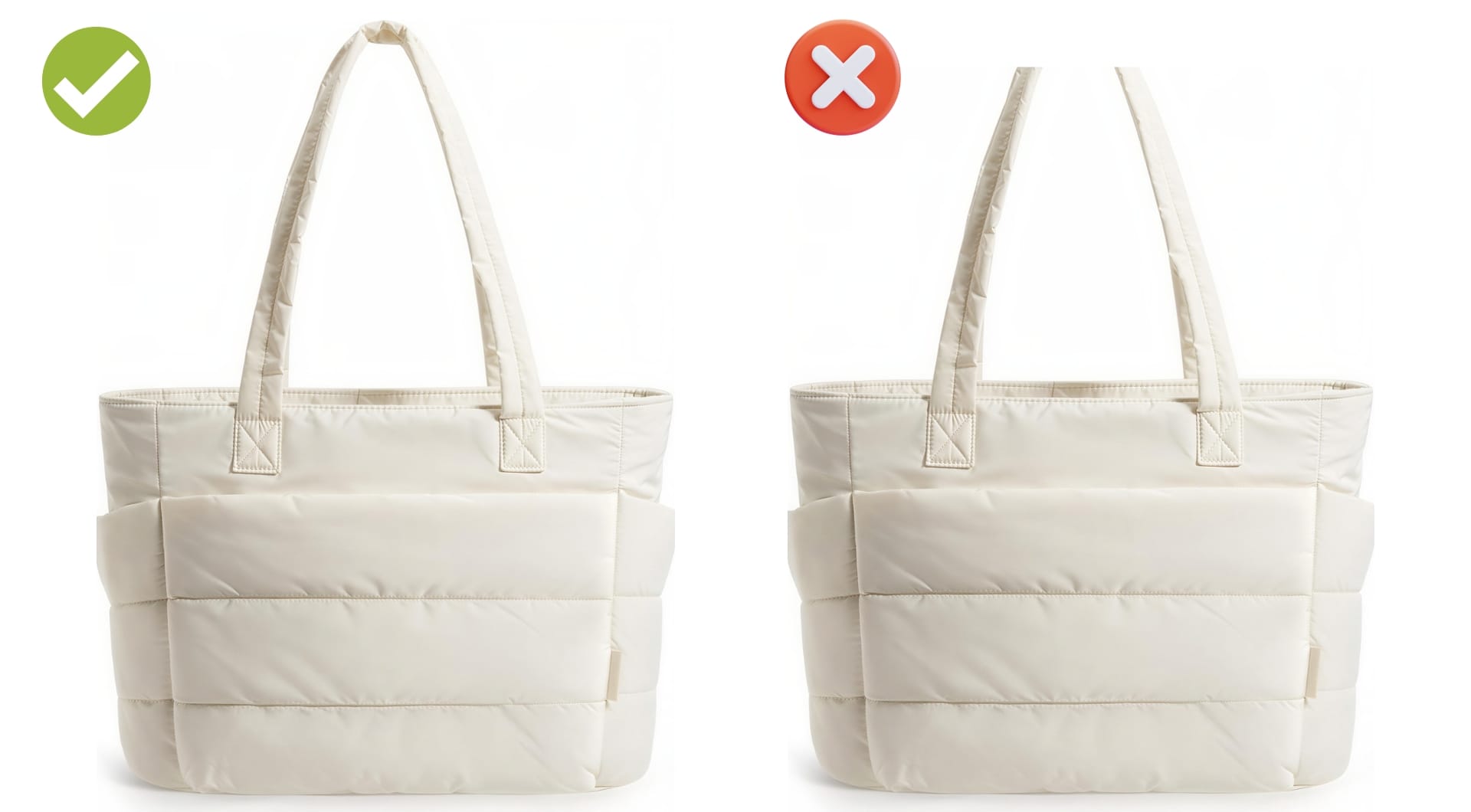
Category-specific rules: Apparel main images for adult-sized clothing require a standing model. No sitting, kneeling, or lying down, and no mannequins. For shoes, show a single shoe facing left at a 45-degree angle.
Technical specs at a glance
| Spec | Minimum | Recommended | Maximum |
|---|---|---|---|
| Longest side | 500 px | 2,000 px | 10,000 px |
| Aspect ratio | Any | 1:1 (square) | Any |
| File size | — | — | 10 MB |
| File formats | JPEG, PNG, TIFF, GIF (non-animated) | JPEG | — |
| Background (main image) | RGB 255,255,255 | RGB 255,255,255 | — |
| Product fill (main image) | 85% of frame | 85–90% | — |
| JPEG quality | — | 85 | — |
Secondary images and A+ content
Secondary images (at least six images and one video) have far more flexibility than the main image. A white background is recommended but not required. This is where you can include:
- Lifestyle photography (product in use, in context)
- Infographics highlighting dimensions, features, and materials
- Multi-angle shots (front, back, sides, interior)
- Comparison images
- Close-up detail shots
Amazon recommends having at least six images and one product video per listing. Listings that include video and multiple high-quality secondary images consistently outperform those that rely on a single compliant main image.
A+ Content is available to brand-registered sellers and allows richer visual storytelling. Standard A+ Content image sizes: module images typically require 970×300px for full-width banners and 300×300px for comparison module images, though exact specs depend on the module type. Enhanced content from A+ has been shown to increase conversion rates by 5–10% according to Amazon's own benchmarks.
File naming: Amazon uses a specific naming convention. The format is: [product identifier].[variant code].[file extension]. For example, B08XYZ1234.MAIN.jpg for the main image, B08XYZ1234.PT01.jpg for the first alternate. MAIN, FRNT, BACK, RGHT, LEFT, BOTT, TOPP are the common variant codes.
What triggers listing suppression
Most suppression comes from main image violations. Here's what Amazon's automated systems flag most often:
- Off-white background: Visually white but not RGB 255,255,255.
- Promotional text or badges: Anything added to the image such as "New," "Sale," a star rating, a "Best Quality" badge.
- Product too small in frame: failing the 85% fill requirement.
- Props not included in the sale: accessories, styling items, or other products not sold with the listing item.
- Product still in packaging: main image must show the product itself, not the box it comes in (with exceptions for consumables and collectibles).
- Images with layers: flattened files only; layered PSD or TIFF files won't be accepted.
Etsy image requirements
How Etsy differs from Amazon
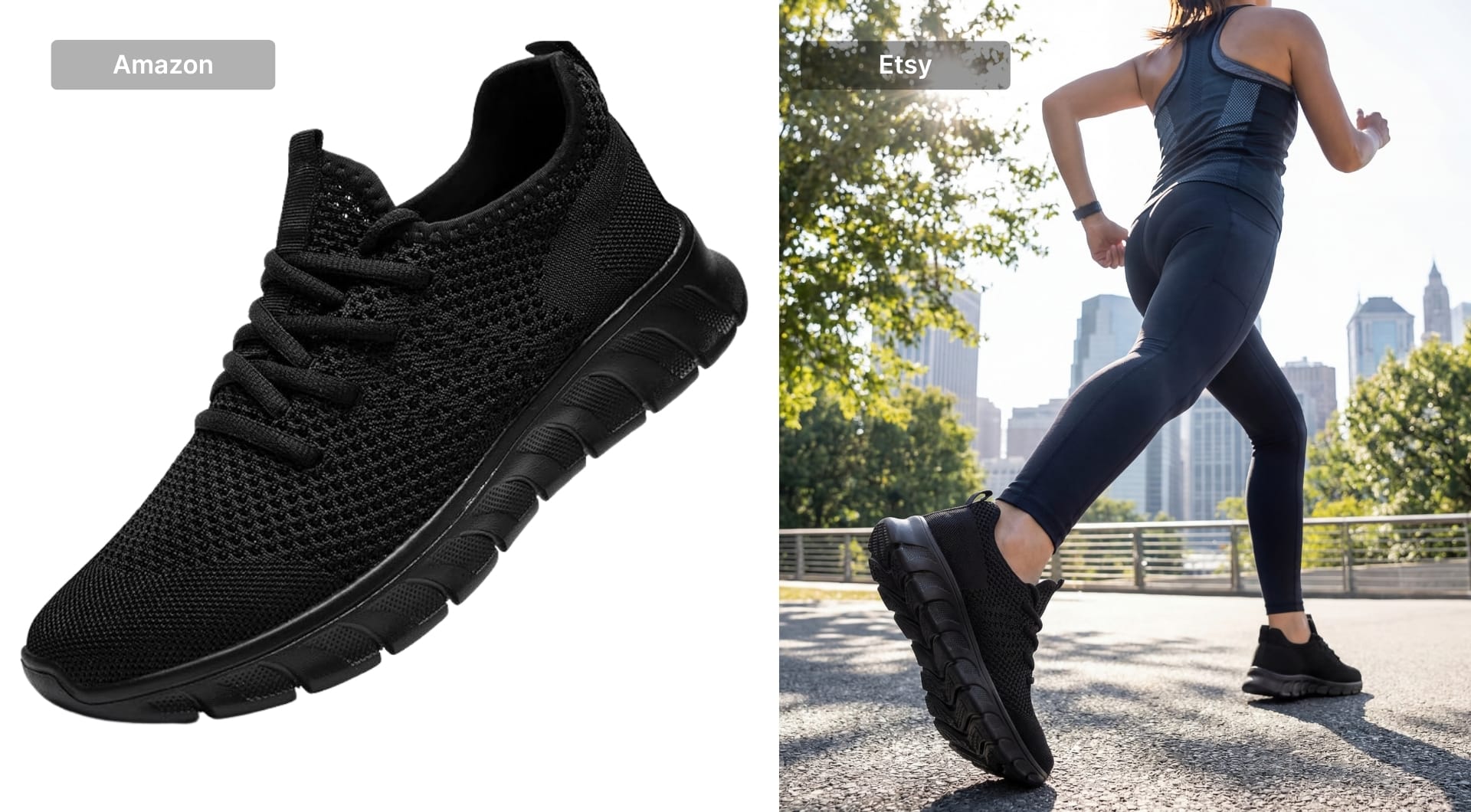
Etsy is a marketplace built around craft, creativity, and personal connection and its image guidelines reflect that. There is no white background requirement. Sellers are actively encouraged to use lifestyle photography, styled backdrops, props, and creative compositions. What Etsy cares about technically is resolution and upload compatibility, not background color or product fill percentage.
Listing photo specs
| Spec | Minimum | Recommended | Maximum |
|---|---|---|---|
| Shortest side | — | 2,000 px | — |
| Aspect ratio | — | 1:1 square | — |
| File size | — | Under 1 MB | 1 MB (uploads above this may fail) |
| File formats | JPEG, PNG, GIF, SVG, and HEIC (non-animated) | JPEG | — |
| Color mode | — | sRGB | — |
| Photos per listing | 1 | 10 (use all slots) | 10 |
On resolution: Etsy's official recommendation is 2,000 px on the shortest side. This is what enables the zoom feature. If your image is below that threshold, the zoom function is disabled. Note that your first listing photo must be at least 635×635 px and images below this minimum may rank lower in Etsy search results.
On file size: Etsy compresses images on upload to optimize page performance. Uploading files larger than 1 MB can cause upload failures, especially on slower connections. A 2,000×2,000 px JPEG compressed to JPEG quality 85 will typically come in under 500 KB.
On color mode: If your image appears with wrong or washed-out colors on Etsy after upload, the issue is almost always the color profile. Convert your images to sRGB before uploading. CMYK images (common in files prepared for print) will display incorrectly.
Transparent PNG files: Etsy doesn't support transparent backgrounds in listing images. Any areas of transparency in a PNG will render black on the listing page.
Thumbnail behavior and aspect ratios
Etsy displays listing thumbnails in different aspect ratios depending on where they appear and what device is being used. Desktop search currently uses a roughly square crop; the Etsy app tends toward a 4:5 portrait crop; the homepage uses multiple different formats simultaneously. That's why a 2,000×2,000 px square image is the most reliable format.
Whatever aspect ratio you choose, keep the product centered with adequate space around it. Etsy's cropping behavior can cut off edges, and anything important placed near the frame border risks disappearing in certain views.
All Etsy image types and their specs
| Image type | Minimum size | Recommended size | Notes |
|---|---|---|---|
| Listing photo | — | 2,000×2,000 px | First photo = thumbnail |
| Shop icon | — | 500×500 px | Represents shop in search |
| Profile photo | 400×400 px | 400×400 px | Can't be deleted, only replaced |
| Mini shop banner | 1,200×160 px | 1,600×213 px | — |
| Big shop banner | 1,200×300 px | 1,600×400 px | — |
| Carousel banner | — | 1,200×300 px | Etsy Plus only |
| Collage banner (2 images) | 600×300 px each | — | Etsy Plus only |
| Order receipt banner | 760×100 px | — | Low-key branding touchpoint |
| Team logo | — | 170×100 px | For Etsy team pages |
The 10-image slot strategy
Etsy gives you 10 photo slots per listing. Listings that use 7 or more images consistently outperform those with fewer. Here's how you can fill all 10 slots in a way that serves conversion:
- Hero shot: clean, well-lit, product as the clear subject. This is your thumbnail.
- Lifestyle context: the product in use or in its natural environment. If you want to generate high-quality AI lifestyle images for your products, check out Claid's AI Photoshoot.
- Scale reference: something that communicates size without requiring the buyer to read a description.
- Detail close-up: the texture, the stitching, the material, the finish.
- Back or alternate angle: whatever the front doesn't show.
- Secondary lifestyle: a different context, season, or use case.
- Packaging or presentation: how it arrives. Relevant for gift purchases.
- Variation or color options, if applicable.
- Product in action: being worn, used, or displayed differently from image 2.
- Dimensions or infographic: measurements or care instructions for products where those questions are common.
Etsy also allows one video per listing (3-15 seconds). A short product video in the gallery further differentiates the listing and increases time-on-page.
Where sellers actually get stuck and why AI upscaling helps
The resolution gap
The specs are clear. The problem is that the images sellers actually have often don't meet them.
A product photo shot on an older smartphone might be 1,200×1,600 px. Supplier photos for private-label or wholesale products frequently arrive at web resolution: 800 px wide, 72 DPI. Even professionally shot images can come back from a photographer smaller than expected, especially if the originals were delivered compressed.
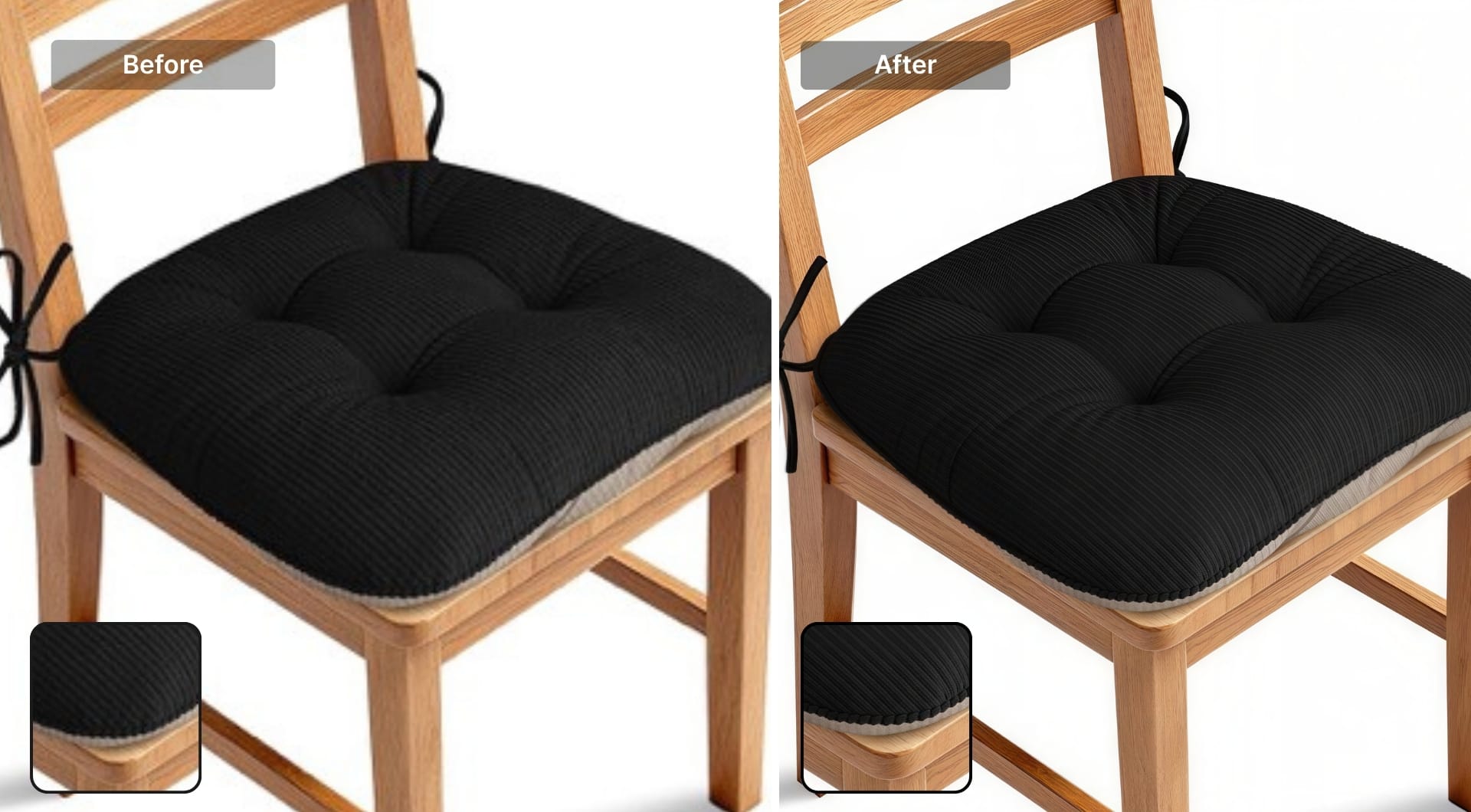
AI upscaling uses neural networks trained on millions of images to reconstruct detail. It generates plausible high-frequency texture, edge sharpness, and fine detail. The output is a larger image that looks like it was shot at higher resolution, and not like it was stretched.
What Let's Enhance does
Let's Enhance is an AI upscaling and image enhancement platform built for exactly this kind of workflow. Upload a low-resolution product photo and you get back an image that meets marketplace specs and holds up at zoom.
The recent default model, Prime, is built to enhance what's there without replacing it. From fabric grain and food texture to packaging surface detail, Prime keeps texture and detail intact and believable. Upscaling goes up to 16×, with output up to 256–512 megapixels depending on plan tier, and up to 500 megapixels on business plans.
Beyond upscaling, Let's Enhance handles the surrounding prep work in the same place: Light AI balances out the colors and fixes lighting, background removal prepares images for Amazon's pure white requirement; and the Chat Editor lets you make any edit with simple prompts. For sellers managing large catalogs, batch processing allows to upscale 20 images at once. You can also check out the API via Claid.ai if you need to upscale images at scale.
If your current product images aren't hitting the resolution or quality thresholds either platform expects, sign up for LetsEnhance and get 10 free credits to run your hero images and see the difference before committing to anything.
FAQ
What is the minimum image size for Amazon product listings?
The technical upload minimum is 500 px, with 1,000 px required for zoom. Below this threshold, Amazon's zoom function is disabled entirely. The recommended size is 2,000 pixels on the longest side (typically 2,000×2,000 px for a square image), which delivers genuinely sharp zoom on both desktop and mobile displays. There's no meaningful visual improvement above 2,000 px for standard product photography, though Amazon accepts images up to 10,000 px and 10 MB.
Why does Amazon suppress listings for off-white backgrounds?
Amazon's automated systems compare every pixel in the main image background against the exact RGB value 255,255,255. If even a portion of the background doesn't match, the listing can be suppressed.
The most common mistake is shooting against a white wall or sheet and assuming it's compliant. Physical whites almost never register as RGB 255,255,255 under normal lighting. A color picker in Photoshop or another editing tool can confirm the exact value before upload.
What's the difference between Amazon main image and secondary image rules?
Main images have Amazon's most restrictive requirements: pure white background, no text or overlays, product fills 85% of frame, no props not included in the sale, product shown outside packaging. Secondary images (slots 2–9) have significantly more flexibility. White backgrounds are recommended but not required. Lifestyle photography, infographics, text callouts, comparison charts, and multi-angle views are all allowed.
What is the best image size for Etsy listings?
The current best practice for Etsy listing photos is 2,000×2,000 pixels in a square (1:1) format. Etsy officially recommends listing photos have a width and height of at least 2,000 pixels. Technically a 2,700×2,025 px image at 4:3 ratio also works, but because Etsy will crop it differently in different contexts, important product details can get cut off if they're close to the edges.
Does Etsy require a white background?
No. Etsy explicitly allows styled photography with creative backgrounds, props, lifestyle context, and color. The platform's aesthetic is built around handmade and vintage goods, where visual personality is part of the product. Clean white backgrounds still perform well for products where detail matters (jewelry, small crafts), but there is no platform requirement for one.
What causes blurry images after uploading to Etsy or Amazon?
First, the original image was below the recommended resolution, and Etsy or Amazon displayed it at a size larger than its native dimensions. The solution is to start with images that are at least 2,000 px on the relevant dimension.
Second, Etsy automatically compresses images on upload to optimize page performance. Some sharpness loss from compression is normal. To minimize its impact, upload images that are already at the right resolution before compression rather than oversized files. If your original image is genuinely too small, AI upscaling (not standard resizing) can increase the pixel count while recovering detail.
What is AI upscaling, and how is it different from resizing?
Standard resizing, whether bicubic, bilinear, or nearest-neighbor interpolation, increases the pixel count of an image by mathematically estimating what the new pixels should look like based on their neighbors. It doesn't add new information. The result is a larger file that's usually softer or blurrier than the original.
AI upscaling uses neural networks trained on millions of images to do something more sophisticated: it identifies what type of content is in each region of the image (fabric texture, edge, skin, packaging text) and generates new pixels that are consistent with how that content type actually looks at higher resolution.
Can I use LetsEnhance to batch process my entire product catalog?
Yes. LetsEnhance supports batch processing of 20 images at once and the Claid.ai API is built specifically for high-volume, catalog-scale workflows. Via the API, you can submit batches of images programmatically and receive results via asynchronous webhooks, rather than waiting for each image to complete before submitting the next.
