
Getting started with POD is not hard. Keeping quality consistent at scale is.
When the first step is done, you realized you want to start-up, so it’s high time to move forward:
- Step two: what exactly do you want to produce? T-shirts, cups or maybe backpacks? Hope you are done with it.
- Step three: design - and that’s where the problem began to appear.
- Step four: think about you brand strategy. What do you want exactly? The problem is coming closer…
- Step five: where to sell... WHERE? And HOW?....it’s coming so close that’s you even start feeling ticklish
- Step six: how to create a proper promotion and gain new customers?
The good news is that there are lots of software tools that were invented to help you and make life much easier. Let’s divide them on their purposes:
- Photo editing tools
- Tools for brand identity
- Design tools (logo and design creators, mock-up generators)
- Process management tools
Photo editing tools
This is where POD breaks in the real world.
Not because your design is bad, but because print punishes weak files. Low resolution gets exposed. Compression artifacts show up. Edges look rough. Backgrounds aren’t clean. Bleed is missing. Then you spend hours fixing problems you didn’t create. There are a lot of tools that prevent that by making your files print-ready.
Now, let’s go ahead and talk about some tools that can be of help.
LetsEnhance
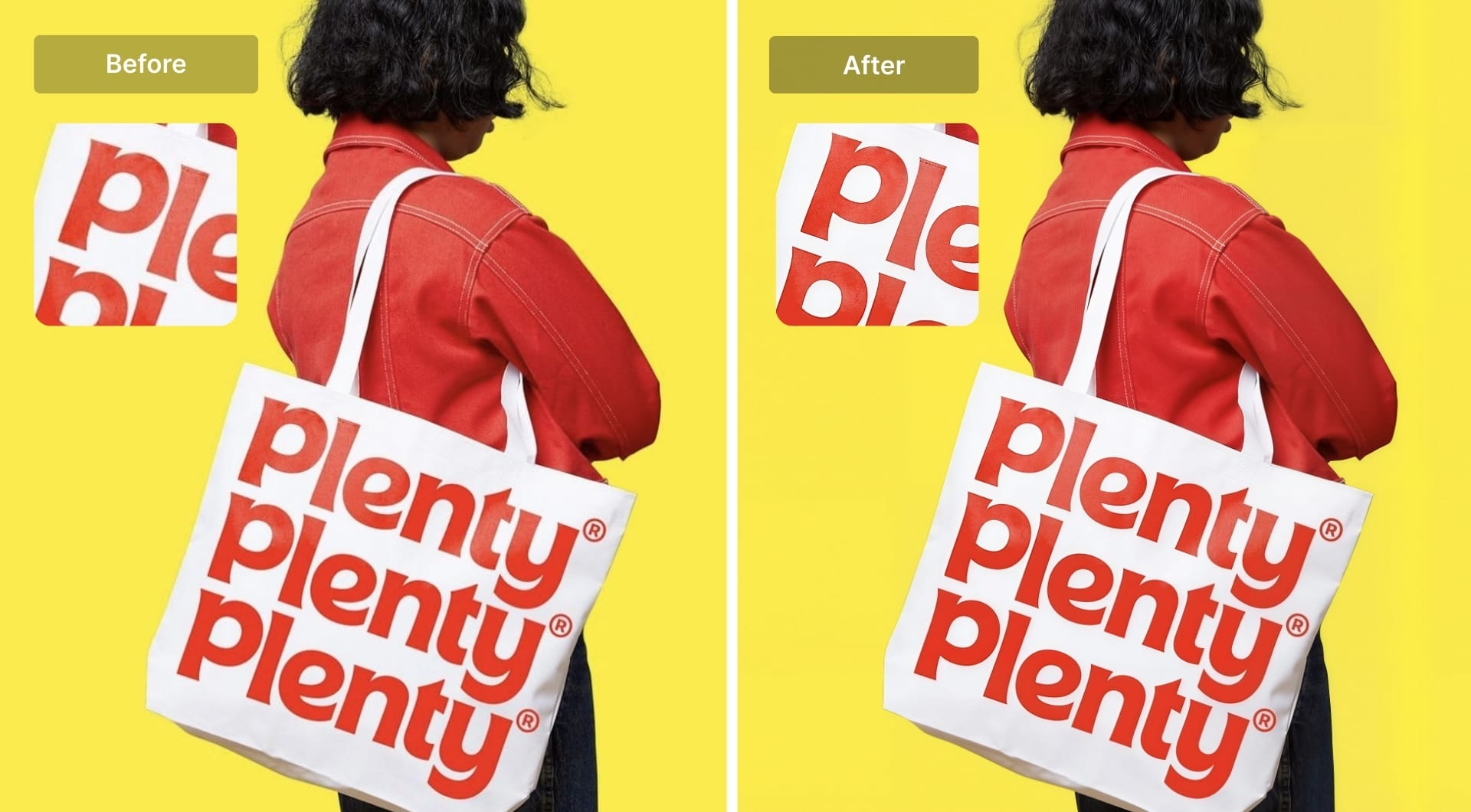
LetsEnhance is best when your biggest enemy is the file itself: low resolution, heavy JPEG compression, soft details, or assets that need to become print-ready without rebuilding them from scratch.
If customers upload tiny images (or you source artwork that is not print-sized), upscaling is the first gate. LetsEnhance supports upscaling up to 16× and lets you set a custom target size rather than guessing. It also offers multiple specialized upscaling modes designed for different inputs (for example, photos vs digital art vs old scans). You can also increase DPI to 300+ and use built-in printing presets for high-quality source file and printing.
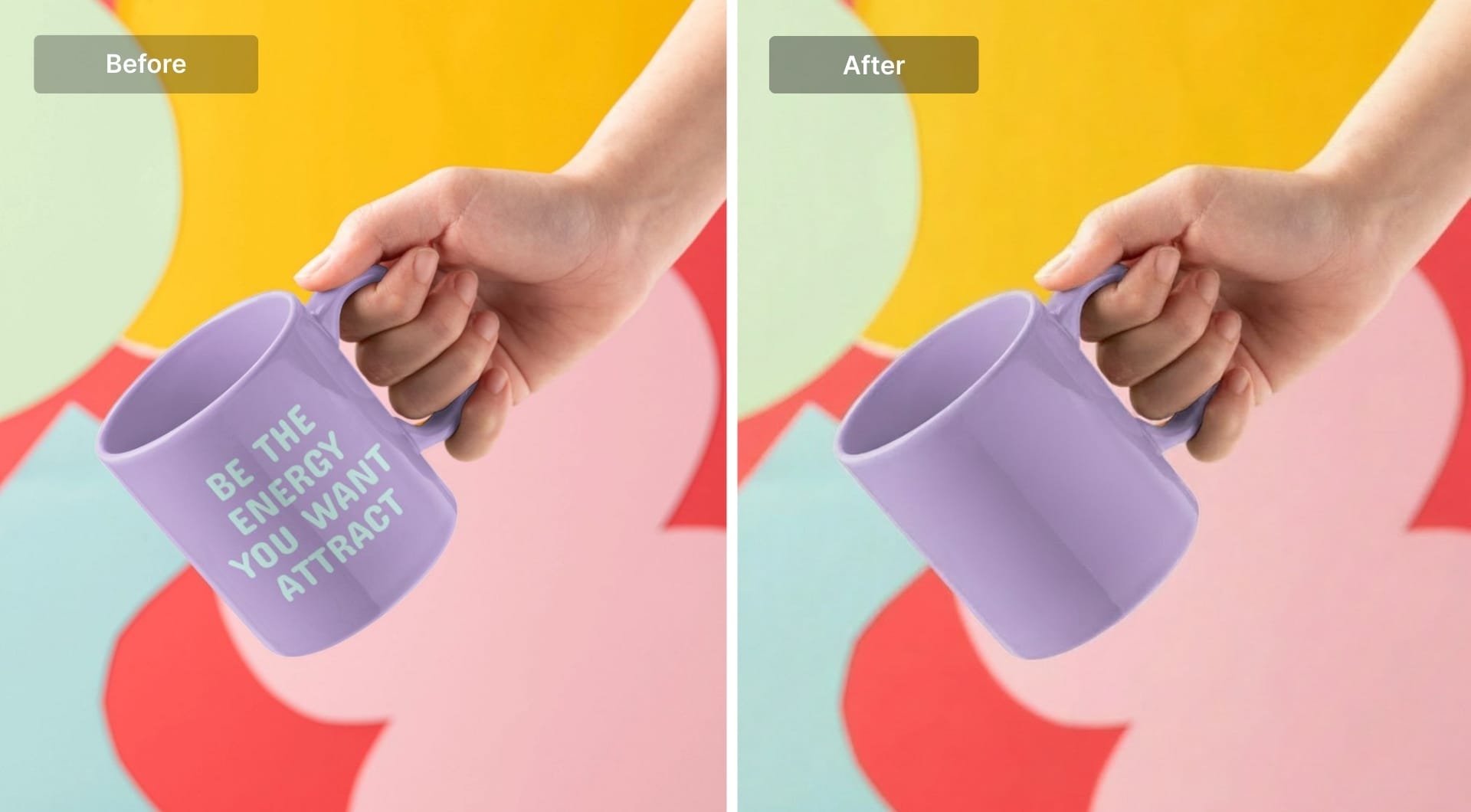
Beyond upscaling, sometimes you need to make quick edits without design skills. LetsEnhance’s AI Chat Editor is built for that: you upload an image and describe what you want to change in plain language. That is useful for quick fixes like changing text, adjusting a background, or nudging details without reopening source files.
Claid.ai
Claid.ai is best when your pain is not a single image, but the system: you need consistent catalog visuals, clean cutouts, fast resizing, and repeatable edits at scale. It is built as an e-commerce editing suite with a strong API orientation.
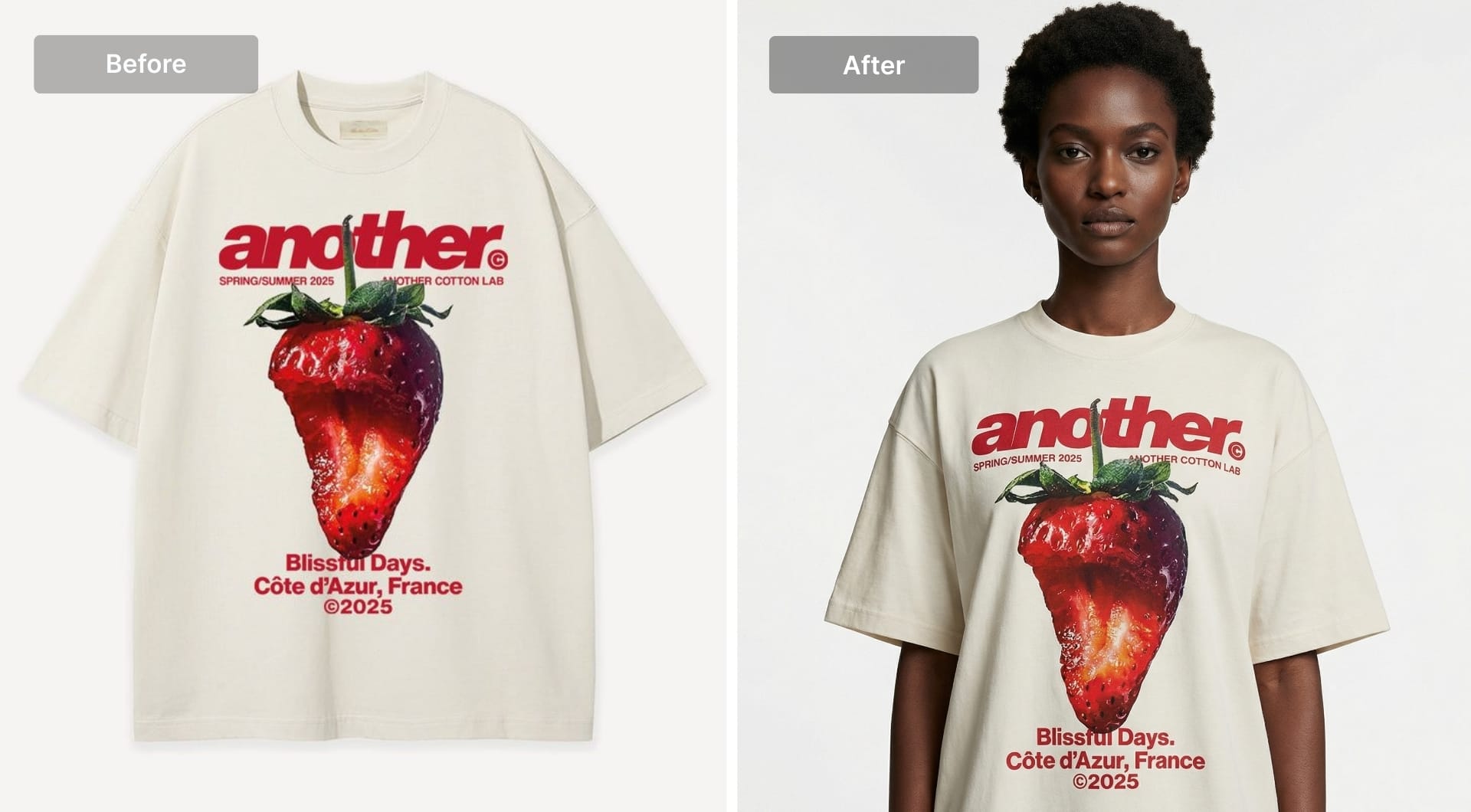
You can use Claid for image enhancement (sharpen, fix colors, increase resolution), background removal or background generation. In case you need stronger creative output for ads and hero listings, use its AI Photoshoot or background generation workflow to generate 2K and 4K product scenes from a single image.
PicMonkey
PicMonkey is an awesome online photo editor. You can not just simply edit and add filters, but add also graphics on your photo, use templates for your marketing and printing tools. It has really good collection of designer-curated textures and frames to boost the fantastic design (which you can use on your apparel) and a ‘touch-up’ function - one-click edition.
Pixlr Pro
Pixlr Pro is one of the most powerful web-based image editor. Removes the background, hale and patch to remove objects, convert photos into a vector art. Has professional tools which are easy to use for newbie. Has Pixlr Pro version what allows access to premium fonts, PSD templates and royalty stock filters.
Brand identity
If you don’t want to be ‘noname’ on the market and lost among more powerful others, so you probably need to create a brand cell.
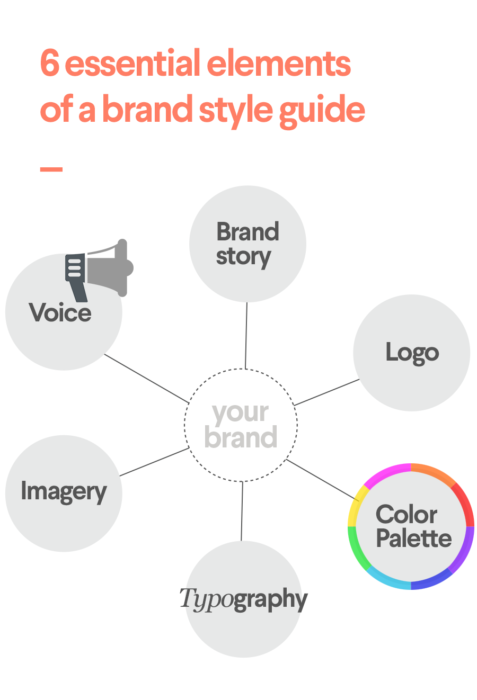
The brand design portrays an image of your company to future customers and determines how your brand will be perceived. The main goal - is to be recognizable in the brand-overloaded world (and afterwards get loyal customers of course). By the way, we highly recommend this brilliant book for you as a helpful tool that will suit any business model https://www.pwc.com/us/en/careers/campus/assets/img/programs/personal-brand-workbook.pdf
What exactly will you need to create a brand identity?
That’s all will help you to encourage people to engage with you.
Naming
Name generators will not “invent” your brand, but they are good at exploring combinations and checking domain availability. Their algorithms are almost the same: you write down the keyword and it creates hundreds of variants.
Use them for breadth, then shortlist based on pronunciation, spelling, and domain sanity.
Brand Colors
Brands colors is an important part. You know colors strongly affect our brand perception and may cause even misapprehension of it.
Palette generators is an awesome way to find out what exactly color palette you will need for your brand design. If you can name only one color for your future brand, that’s not a big deal. The others will be automatically generated based on the best design practice for you and you need just to choose what fits your brand vision the most.
Here are two links where you can browse thousands of color combinations to find your perfect match.
If you plan to print packaging, include at least one dark neutral that stays readable on kraft and uncoated stocks.
Design tools
At this stage you have two typical design realities:
- you’re not a designer yet, but you need assets now
- you are a designer, and you need speed and organization, not more features
Canva
Canva is still the go-to for beginners because it gets you to “usable” quickly. Logos, simple apparel graphics, listing images, banners, ads, printables. You can move without learning a full pro design suite first.
Treat Canva as a production tool, not a forever-identity generator. As soon as you have traction, you’ll want core brand assets in a vector format, so you can scale cleanly across print sizes.
Tailor Brands
It uses an intuitive algorithm to create a custom logo. For making it you need to enter a name, choose an industry you are in and to add some description to make it more custom. After that AI you several options to choose and you can add extra-features to make it even more customs. What’s great for POD it allows to see how the created logo looks in use on apparel, company merchandise and social media pages.
Designhills
The service names itself as smart logo-maker, but they also offer designs for T-shirts and apparels specifically for POD. The process is a bit more complicated than in mock-up generators, but as a logo-maker it has a better variety of automated unique logos and why not to make some company merchandise on it?
Mock-up services as a time-money-psycho-saver
If you never thought yourself as a designer, nevermind. If you don’t have access to the design tools, designer or even simply have a lack of time and energy, nevermind. Human beings have already created services specifically for lazy bones. Mock-up services offer a magnificent variety for all the needs and phenomenal ability to customize. Some of the mock-up services are already integrated into the big platforms (such as Printful and Printify), so do not hesitate to use them it in your workflow.
Here are two winners of a race:
Placeit
Placeit has the world’s largest mock-up library with more than 13k+ templates for whatever apparel. This service offers you not only to create designs for your T-shirts. It has video and slideshow mock-ups, multi-purpose design templates, it has a logo-maker with more than 3000 templates. By the way, it allows creating designs for your marketing campaign, because it has mockups for social-media posts, Youtube banners and templates for ads in various sizes.
The main obstacle is that you should pay for every single mock-up design you create and the price depends on the type of action. If you are going to use a service on all cylinders the Placeit offers a subscription what is much more affordable.
Printful
These guys managed not only to build a powerful printing platform but also one of the most user-friendly printing mockup generator. It allows you to use their templates and clip arts or to upload your own design. It's very time-saving if you are using Printful platform as it integrated into their workflow. Easy-peasy-lemon-squeezy!
Printify
This printing platform also provides mockup generator with templates and designs, but it as not user-friendly as the ones above. It requires really long registration and has not so many designs to offer. But in case you favour Printify to work with and prefer simple designs, that’s really cool to have all-in-one place and not to distract to others.
And last but not least: final flourish we can’t avoid and NOT TO TELL.
These things you need to do every time:
- To understand your customers needs:
Quorra and Reddit are always in charge to help you - To be well-informed in the last tendencies in printing, check, find and read for inspiration these resources:
- Behance
- It's Nice That
- Designspiration
- Medium
Any helpers with the workflow?
POD is not just design and uploads. It’s revisions, customer questions, supplier specs, variant management, and the recurring chaos of “where is the final file.”
If you’re solo, you can get far with a simple task board plus a folder structure. If you’re running a print shop or a team, purpose-built workflow tools can help.
Printavo
Printavo is a cloud-based shop management software specifically designed for printing business purposes. It helps to increase shop efficiency and your team to stay organised. What’s inside?
- A calendar involved in your workflow, where you can track your orders and see on what stage are your tasks
- Customers base with well-organised shopping and billing information
- E-mail platform to communicate with your clients directly from Printavo system, send them mock-ups with design and approve it right in the workflow
- Payment system inside the workflow: you can manage your payments, customer can pay using the secret link you sent to him
- Analytics, where you can take a look on your revenue, expenses and sales by users. It gives a great view into the profitability of your business.
Design’N’Buy
Design’N’Buy is an awesome online design tool lab that offers Web to Print Software for you POD business to galvanize your stores offering. It has 3 products for you to work with:
- All-in-one Designer
Web to print software for multi-store B2B and B2C setup - must-have for printing apparel business It is highly customized to fit your business requirements. The store offers a variety of ready-to-sell products and also personalized as well. It has a design studio based on Adobe Flash where customers can create a unique design they want. - PrintCommerce
It was created to solve all business printing needs for personalization. It offers to integrate its product design studio into your website and to generate ready-to-print art files made by your customers. It has integrations with e-commerce platforms like Magento, PrestaShop, Opencart and NopCommerce. - Product Configurator
This tool goes beyond personalization and lets customers to built and design their products on demand. It has a tremendous variety to choose the products to design - from simple apparel till automobiles and furniture.
Ordant
Odant is a cloud-based MIS software specifically made for Print companies and Sign shops. Frankly, it’s a very customisable application that produces complex estimates and manages orders in a few seconds. This software makes possible for customers to calculate the precise cost of projects and place orders online, upload files and track order processes.
What integrations do POD-platforms use?
Well, since we’ve researched the software you can use for design and brand making in POD, it’s high time to observe what e-commerce integrations big fish platforms use.
We checked TOP-5 printing platforms and here what we have got:
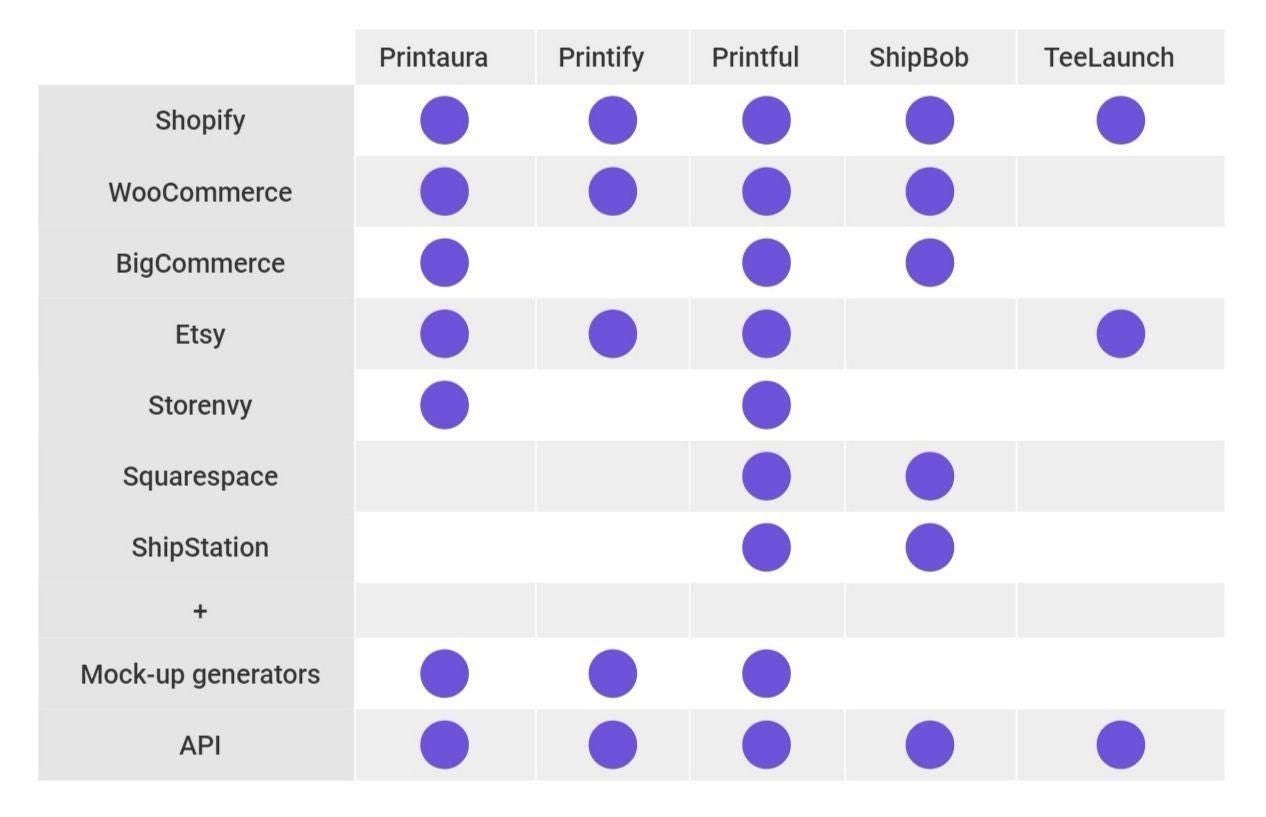
All of the platforms offer API to automate your POD-business connecting the printing platform with your e-commerce store. And that’s awesome because you can make more money, but you can’t make more time.
What is more, some of them have super-unique integrations.
ShipBob offers Magento and BackerKit e-commerce platforms to use, Printaura uses Opencart and Printful has a connection with Ecwid, Gumroad, Bigcartel and PrestaShop. By the way, Printful has integrations directly with marketplaces like Amazon, Inktale and Ebay (what other platforms can’t provide).
If you are already done with your printing platform, you have also to choose your e-commerce platform to sell online. What about their fees and auto-fulfillment?
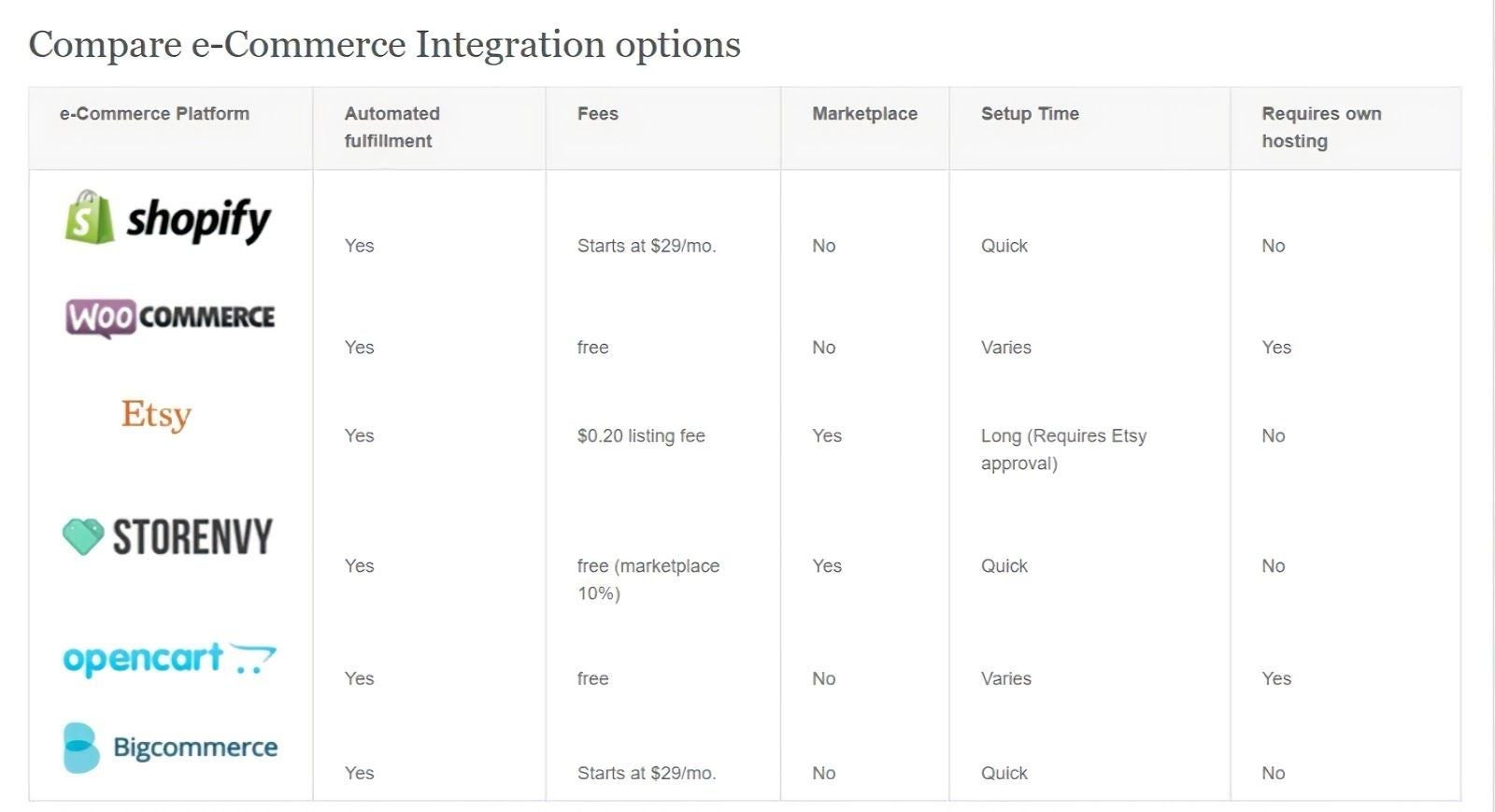
Last but not least, if you want to also make the right marketing decisions for your POD through proper metric analysis, check out this article.
FAQ
What is the minimum image size for printing on demand?
It depends on the physical print size and print method. The practical rule is: don’t stretch low-res files and hope. If you accept customer uploads, plan to upscale and clean artifacts as part of your pipeline.
Why do prints often look darker than on screen?
Screens emit light, prints reflect it. If you want reliable results, you need consistent tonal adjustment and color handling before print, not guessing at the final output.
Should I convert files to CMYK myself?
Sometimes your printer handles conversion fine. But if color consistency matters, CMYK control can be useful. LetsEnhance added CMYK conversion support in its API to help printing customers maintain accuracy.
What is bleed and when do I need it?
Bleed is extra image area beyond the trim line. You need it for edge-to-edge printing so small cutting shifts don’t leave white borders.
Do I still need a separate background remover?
Not necessarily. AI tools like LetsEnhance and Claid.ai offers background removal within their workflow, so you can easily get transparent PNG cutouts.
